

Voicemod 1.6.24
Voicemod is easy to use with Discord. The interface is simple, and you can start using it right away. If you want to keep your identity hidden while gaming, Voicemod is a great choice.
- Free
- Windows
- macOS
- Android
- iOS
- Nov 3, 2026
c35cfd1cf0c455fc973f447cd3aad4a08e957bd7a38421a3a2b039acb0fd6232VirusTotal report ↗29eeca58b8d7548c2cb06629d065293b3df965da1160676c1bc0d13a168c25b5VirusTotal report ↗Screenshots
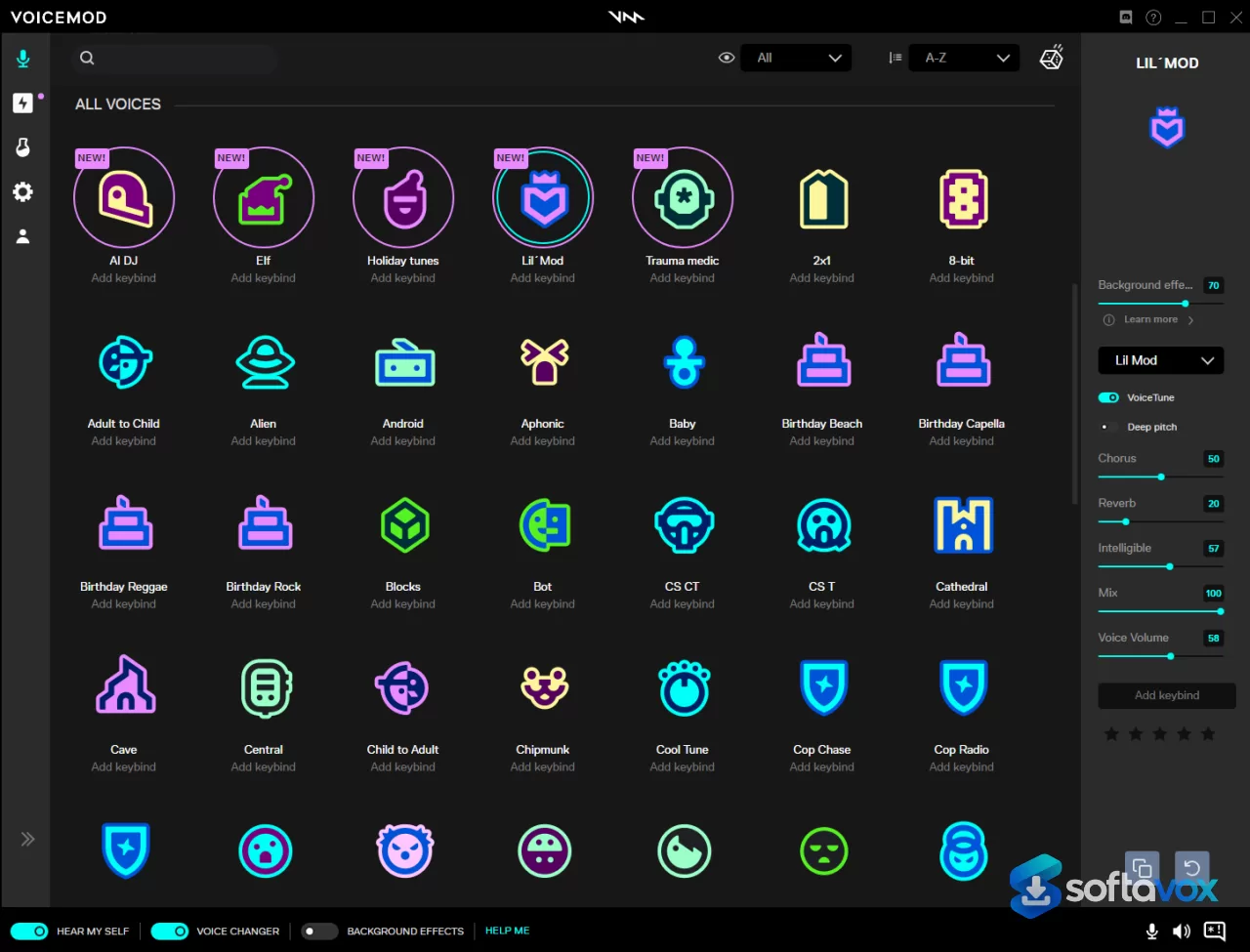
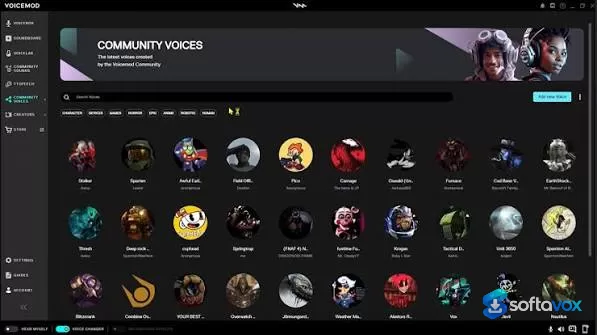
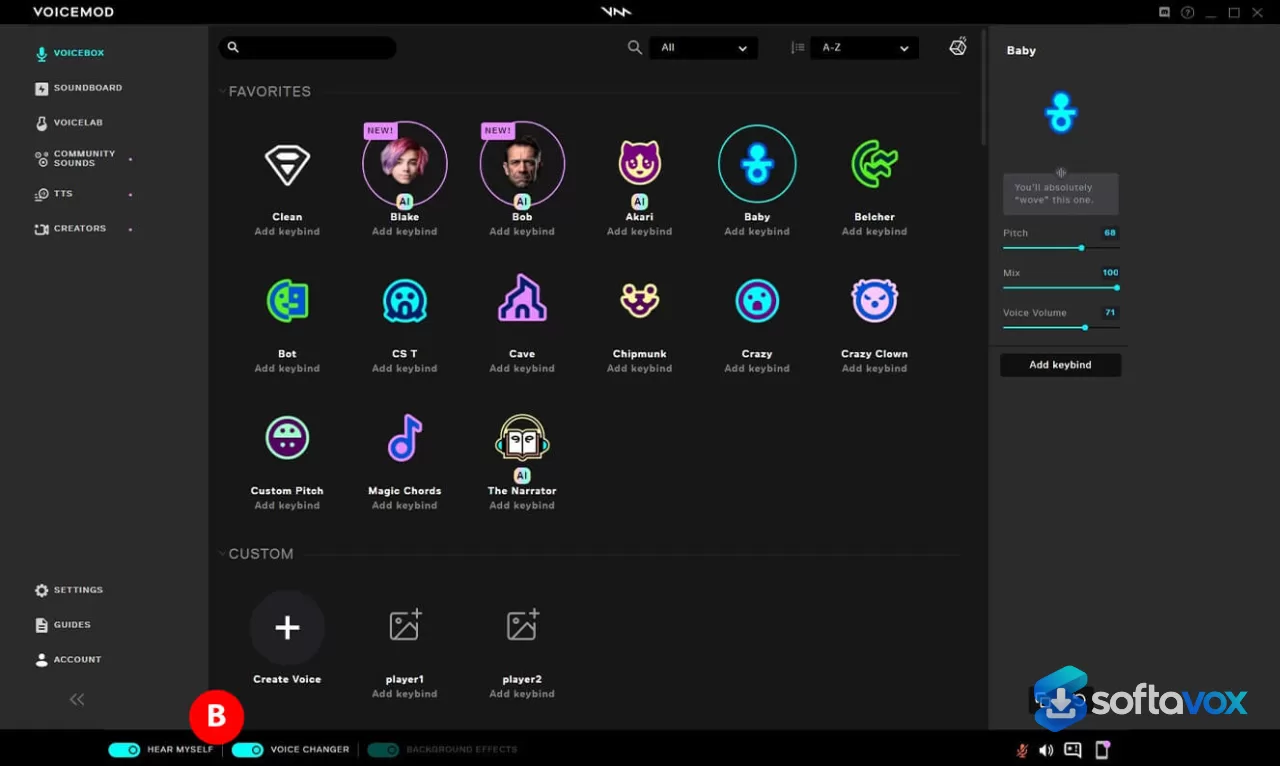
About Voicemod
Voicemod Download | Real-Time AI Voice Changer & Soundboard for Gamers and Streamers
TL;DR Quick Take / Who is this for?
Voicemod is a real-time voice changer and soundboard built for gamers, streamers, Discord communities, and tabletop role-players who want to change how they sound live, not in a recorded file. The desktop app installs a virtual microphone, you select it as your input device in Discord, OBS, or a game, and Voicemod processes your voice in real time with AI voices, effects, noise suppression, and keybind-triggered sound clips. The free tier is genuinely usable for testing: it includes access to a rotating selection of voices and a basic soundboard, so you can verify latency, driver compatibility, and whether your target app works before paying anything. Paid plans unlock the full voice library, unlimited soundboards, and VoiceLab for building custom voices. The most commonly cited strength is latency, Voicemod is widely described as the most widely used real-time voice changer in 2026, with genre-leading responsiveness[reference:0]. The most commonly cited weaknesses are the free tier shrinking over time, a clunky V3 interface that has alienated long-time users, and a Trustpilot score that sits at 1.7 out of 5 despite a mostly five-star star breakdown, a gap explained by newer reviews counting more heavily and recent complaints about paywalls and audio glitches[reference:1]. Voicemod is the right pick for live entertainment audio on Windows or macOS. It is not the right tool for professional voiceover production, mobile-only workflows, or anyone who needs clearly published commercial-use terms[reference:2].
Quick Info Box
| License Type | Freemium (Free tier; Pro subscription or lifetime licence) |
|---|---|
| File Size | Approximately 64 MB (Windows installer); varies by version |
| OS Compatibility | Windows 10/11 (64-bit), macOS Ventura 13+; mobile companion app only |
| Latest Version | V3 (current desktop release; version numbers vary by channel) |
| Developer | Voicemod S.L. / Voicemod Inc. (Valencia, Spain) |
Key Features & Real-World Usability
Voicemod’s core workflow is simple and effective. The installer adds a virtual microphone driver, and once you select “Voicemod Virtual Microphone” as your input in Discord, OBS, Steam, Fortnite, Valorant, VRChat, or Twitch, every voice effect and soundboard trigger is routed through that virtual device[reference:3]. The app includes more than 200 built-in voices, a community library that lets you browse and add trending sounds without manual uploads, and a keybind system for firing off clips mid-conversation[reference:4]. VoiceLab, the custom voice builder, layers character effects, devices, surroundings, pitch, reverb, and more than 140 effects into saved presets, useful for tabletop hosts who need consistent character voices or streamers who want a signature sound[reference:5]. Built-in noise suppression and voice enhancement help clean up your microphone before the effect chain, and the mobile companion app works as a remote control for the desktop soundboard rather than a standalone real-time processor[reference:6]. The limits are practical and worth understanding before you install. The free tier rotates a limited daily voice selection rather than giving permanent access to the full catalogue, and it includes one limited soundboard[reference:7]. Recent user reports describe a cap on free soundboard plays, around 75, though Voicemod has not publicly confirmed that number[reference:8]. The Pro tier unlocks the full voice roster, unlimited soundboards, VoiceLab, and cloud content, while a lifetime licence (often cited around $39.99–$60 depending on promotion) appeals to casual creators who dislike subscriptions[reference:9]. Pricing is displayed inside the app rather than on a public pricing page, so you cannot compare plans until you install and create an account[reference:10]. On the technical side, AI voices require an AVX2-capable processor (Intel 2013 or newer, or Apple Silicon), and the app does not run on 32-bit Windows or pre-Ventura macOS[reference:11].
- Real-time virtual microphone: Routes processed audio into Discord, OBS, Zoom, and games without per-app configuration beyond selecting the Voicemod input device.
- 200+ voices and community library: Built-in AI voices and a browsable community catalogue of voices and sound memes, with no manual uploads required for community content[reference:12].
- Keybind soundboard: Assign clips to keys and trigger them instantly during calls or streams; Pro removes the soundboard limit that free users encounter[reference:13].
- VoiceLab custom voice creation: Layer character, device, environment, pitch, delay, and reverb effects into saved presets; a Pro feature with more than 140 effects available[reference:14].
- Noise suppression and voice enhancement: Built-in audio cleanup improves microphone quality before the effect chain, reducing the need for separate noise-gate software[reference:15].
- Mobile soundboard remote: The companion phone app controls the desktop soundboard, useful for streamers who want tactile triggers without alt-tabbing[reference:16].
- Fairly Trained certified AI models: Voicemod states its AI voices are trained with professional voice actors and certified by Fairly Trained, a provenance standard for training data[reference:17].
Pros, Cons & Community/User Feedback
Voicemod’s user sentiment is unusually polarized, and the pattern is consistent across platforms. On Trustpilot, the headline score is 1.7 out of 5, but the star breakdown tells a different story: 55% of 456 reviews are five-star and another 12% are four-star[reference:18]. The gap exists because Trustpilot weights newer reviews more heavily, and Voicemod has received only 38 reviews in the last 12 months, of the 20 newest, 14 are one-star and none is five-star[reference:19]. Those recent complaints cluster around four themes: the free version keeps shrinking (reviewers say almost every voice is locked, with only a small rotating set available), a new cap on free soundboard plays (around 75, per user reports), a mandatory uninstall questionnaire, and audio or performance problems including lost system sound after installation, slow startups, crashes, and microphone settings being changed without permission[reference:20]. On Voicemod’s own Canny feedback board, long-time paying users are blunt. One permanent subscription purchaser describes V3 as slow, with keybinds that cannot be turned off, and says they have switched to other software for a faster experience[reference:21]. Another user who paid for a V2 lifetime licence is frustrated at being forced into V3 and asked to buy Pro again, calling the new interface “clunky and very underdeveloped”[reference:22]. A third says the forced AI integration “completely ruined pretty much all voice changer options” because the AI cannot translate speech properly[reference:23]. Positive sentiment is strongest among users who value the live workflow and the latency. Reviewers on alternative platforms describe Voicemod as the most widely used real-time voice changer in 2026 with genre-leading latency, and the lifetime licence is repeatedly cited as standout value compared with subscription-only competitors[reference:24]. One Trustpilot reviewer who uses it for online D&D sessions says the voice filters and audio uploads make the game “much more immersive”. The practical takeaway is that Voicemod’s core real-time engine remains fast and capable, but the V3 transition, free-tier erosion, and recent stability complaints are the areas where expectations should be managed. If you are on V2 or an older build and the current version works for you, there is little in V3 that justifies an urgent upgrade.
Pros
- Genre-leading real-time latency for live voice changing in games, Discord, and OBS
- 200+ voices plus a large community library and keybind-driven soundboard
- VoiceLab custom voice creation with more than 140 effects for layered presets
- Virtual microphone routing works without per-app configuration beyond device selection
- Lifetime licence option (roughly $39.99–$60) is rare in this category and appeals to casual creators
- Fairly Trained certified AI models and built-in noise suppression
- Free tier is sufficient to test latency, driver compatibility, and target-app support before paying
Cons
- Free tier rotates voices daily and caps soundboard plays, with users reporting the free offering shrinking over time
- V3 interface is widely criticized by long-time users as slower, clunkier, and less feature-complete than V2
- Forced AI integration has degraded voice quality for some users, particularly for non-English speech
- Trustpilot score of 1.7 reflects recent complaints about paywalls, audio glitches, and the uninstall questionnaire
- Desktop-only real-time processing; the mobile app is a soundboard remote, not a standalone voice changer
- No public pricing page, plans and prices are visible only inside the app after installation and account creation
- Explicit commercial-use terms are not clearly published despite widespread use in monetized content
- AI voices require an AVX2-capable CPU; older processors are limited to non-AI effects
Final Verdict & Safe Download Advice
Voicemod remains the most practical real-time voice changer for gamers and streamers who want live effects and a soundboard wired directly into Discord, OBS, and in-game chat. The latency advantage is real, the voice library is large, and the lifetime licence option makes it more accessible than subscription-only rivals for casual creators. The free tier is a legitimate trial, not a demo with a meter attached, and it lets you verify the failure-prone parts, drivers, virtual microphone routing, and target-app compatibility, before spending anything. The caveats are equally real. V3 has alienated a meaningful segment of long-time users, the free tier has eroded, and recent reviews point to stability and audio-quality problems that did not exist in earlier builds. If you are new to Voicemod, install the free version, test it in your actual voice chat and streaming setup, and decide based on how V3 performs on your hardware rather than on older reviews of V2. If you are an existing V2 user with a stable setup, there is no urgent reason to migrate. Voicemod is a specialist entertainment tool, and for live voice transformation it still leads the category, provided you go in with realistic expectations about the free tier and the current version’s rough edges.
- Download only from voicemod.net: The official site is the only legitimate source for the desktop installer. Cracked “free Pro” builds and lookalike download pages are the classic way infected installers spread for popular free tools, and security scans confirm the official domain itself is clean[reference:26].
- Verify the installer and publisher: The Windows installer is roughly 64 MB depending on version. A dramatically smaller file, a different publisher name, or an installer bundled with unrelated software is a warning sign.
- Check system requirements before installing: Voicemod requires Windows 10 build 1607 or later (64-bit) or Windows 11, and macOS Ventura 13 or later. AI voices additionally require an AVX2-capable processor (Intel 2013 or newer, or Apple Silicon). The app will not run on 32-bit systems or older macOS versions[reference:27].
- Expect a mandatory uninstall questionnaire: Recent user reports describe being required to answer questions before removing the app. If you prefer a clean uninstall, plan for this step and complete it rather than force-deleting the driver files, which can leave audio configuration in a broken state[reference:28].
- Test the free tier before buying: Use the free rotating voices and basic soundboard to confirm that the virtual microphone works in your specific apps. Pro prices are visible only inside the app, so do not commit until you have verified compatibility and latency on your hardware[reference:29].
- Understand the refund process: Voicemod’s terms describe a 30-calendar-day refund window for Pro purchases, but the request goes through the payment processor (Xsolla or Paddle) rather than Voicemod support directly. Keep your receipt email and start any refund request with the processor shown on it[reference:30].
Similar software





Key features
- Real-time voice changer, live voice effects for Discord, OBS, games, and streaming
- Virtual microphone routing, select “Voicemod Virtual Microphone” as input; no per-app configuration beyond device selection
- 200+ built-in voices, plus a browsable community library of voices and sound memes
- Keybind soundboard, trigger clips instantly during calls or streams
- VoiceLab custom voice creation, layer character, device, environment, pitch, delay, and reverb effects; 140+ effects available (Pro)
- Noise suppression and voice enhancement, cleans up microphone audio before the effect chain
- Mobile companion app, works as a remote control for the desktop soundboard
- Fairly Trained certified AI models, trained with professional voice actors
- Free tier for testing, rotating voice selection and basic soundboard to verify latency and compatibility
- Paid options, Pro subscription or lifetime licence; unlocks full voice library, unlimited soundboards, VoiceLab, and cloud content
- Platforms, Windows 10/11 64-bit and macOS Ventura 13+; desktop-only real-time processing
- AI voice requirement, AVX2-capable CPU (Intel 2013 or newer, or Apple Silicon)
Frequently asked questions about Voicemod
What is Voicemod?
Is Voicemod free?
How much does Voicemod cost?
Does Voicemod work on Mac?
What are the system requirements?
How does Voicemod work with Discord or OBS?
Is Voicemod low latency?
What is VoiceLab?
What are the main complaints about Voicemod?
Why is the Trustpilot score so low?
Should I upgrade from V2 to V3?
Can I use Voicemod for commercial content?
Where should I download Voicemod?
What is the refund policy?
Versions
| Version | Release date | Platform | File size | |
|---|---|---|---|---|
| Voicemod 1.6.24 Latest version | Nov 3, 2026 | WindowsmacOSAndroidiOS | 6.1 MB | Download |
Comments about Voicemod
No comments yet. Share your experience with this program!